
Find My Medical Benefits
From September 1, 2026 onwards
No HKU Portal access yet? Click here for a Summary on Medical Benefits Plans
If your letter of appointment is issued on or after September 1, 2026, your medical benefits plan will be specified in the letter. You may also refer to the table below and, once your HKU Portal account has been activated, verify your assigned medical benefits plan through HKU Portal.
| Medical Plan | Eligibility | UHS Outpatient Services | Coverage Under Group Medical Insurance Scheme | Self-pay Schemes |
|---|---|---|---|---|
| Plan 1 | Appointees* of Professor grade and above (or Bands I & J), and their dependants |
Access is subject to the terms of Group Medical Insurance Scheme. Learn more |
Full Medical Benefits Outpatient General Consultation, Dental Care, Physiotherapy, Chiropractor, Chinese Medicine, Specialist Consultation and Investigation. Inpatient Hospitalization Coverage, Catastrophic Coverage (Staff Only), Supplementary Major Medical, Self-pay Top-up Medical Insurance Plan (Plan 1/2 only) |
Yes Includes immediate family members regardless of dependency |
| Plan 2 | All other appointees* not categorized in Plan 1 or 3, and their dependants | |||
| Plan 3 | Appointees* on Bands A & B, and their dependants | |||
| Plan 4 | Full-time temporary appointees with less than 1 year of service, or part-time temporary appointees with an appointment fraction of 50% FTE or above, and their dependants |
Primary Medical Benefits Selected Outpatient Services via Panel Network Only:
|
||
| Former Appointees | Former appointees whose letters for tenure/substantive appointments were issued before September 1, 2026 and who retired in good standing on the same terms after completing not less than ten consecutive years of service, and their dependants | Outpatient Care at UHS only | No | |
| Former appointees who either left the University on fixed-term appointments at the retirement age of 60, or retired from the University on tenure/substantive terms, after completing not less than ten consecutive years of service, and their immediate family members regardless of dependency | No | No |
*Appointees on Substantive/Tenure/Fixed Terms. Temporary/Visiting appointees: Full-time temporary appointees with more than one year of service and those of visiting nature and their dependants will be grouped to Plan 1-3 with reference to the eligibility criteria of Plan 1-3 and their job grade or band.
August 2026 | Subject to change
How to find my medical plan on HKU Portal?
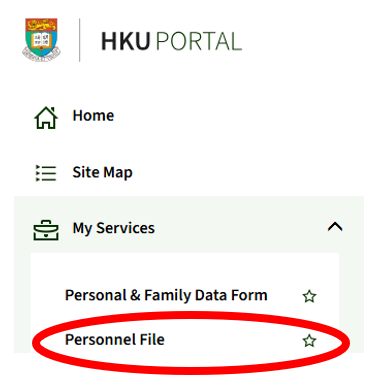
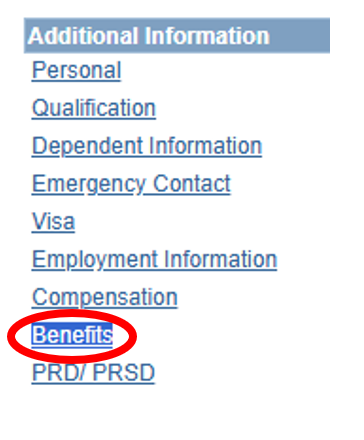
1B. On “Personnel File” page, scroll to end of the page and click “Benefits”
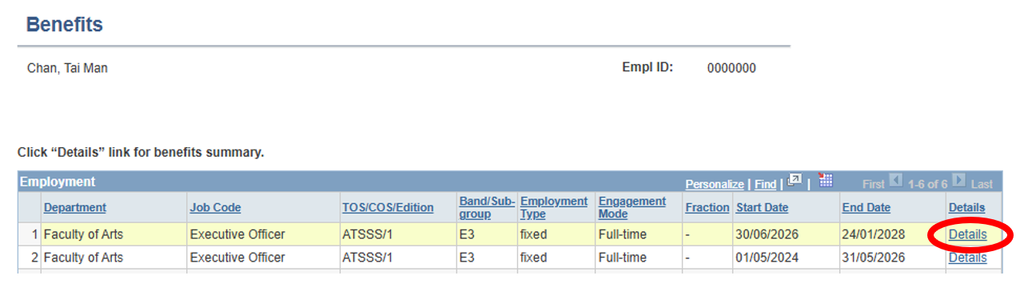
1C. Click ‘Details’ of your corresponding job.
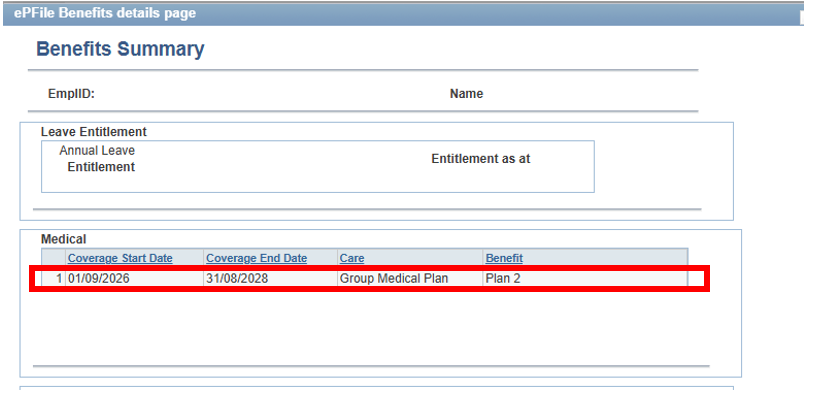
1D. Your medical benefits plan name is listed here. Find out your plan details using the widget on this page.
1. Choose your status:
Information listed herein is for reference only. In the event of discrepancies, the University’s interpretation shall be final.